


Digital marketing is an
essential and cost effective strategy to promote small/medium business.
An online marketing strategy is an important part of the
overall marketing strategy of a business. This is true whether or not a
company is doing business online. It is also true for a small, medium or
large size company but especially true for a small company.
Small business marketing for a local company can include many offline local advertising methods but needs to include a healthy portion of internet marketing strategies to be successful and maximize sales in today's economy. A small business that is doing most or all of its business online, needs to embrace an internet marketing strategy that helps it be seen by online users.
Five Key Areas of Online Marketing for Small Business
There are five areas of online marketing to improve the growth of small business. Some of them are more important to local, offline businesses, while others are more effective with online businesses. Many businesses engage in all five areas of small business marketing on the Internet.
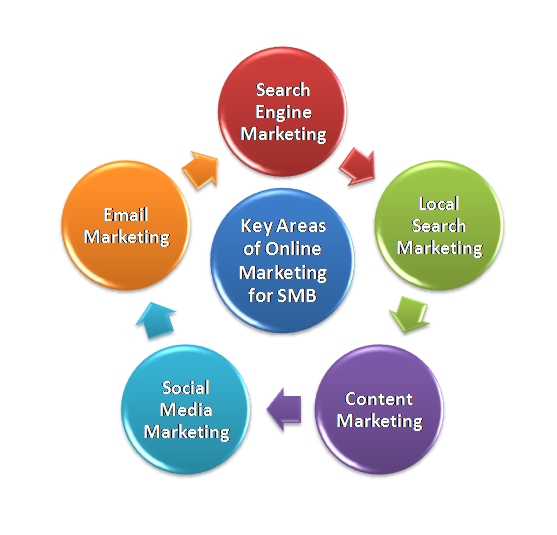
Search Engine Marketing
This portion of digital marketing is critical for a small business. It provides a chance to compete with larger companies by being visible in search engines. Since people use search engines to find products both online and locally, it is important that your company place top in search results for words that relate to what you are selling. Professional Internet marketing firms offer this service under the name of search engine optimization. They can make sure your site is visible to those looking for your product when using a search engine.
Local Search Marketing
This includes website optimization for search results, but in addition, integrates a search engine's function of maps. This is especially true with Google, where your business can be listed with mapping and address information, giving a prospective customer what they need to visit your establishment. Your phone number and website address can also be listed. Customer services will often be available to help someone decide if they are interested in your product or service.
Content Marketing
This strategy revolves around providing a prospective customer information about your product or service, as well as information in general. People will attribute a certain level of expertise to a company, and this instills confidence in the consumer. Content marketing in the past was often done with printed brochures and guide books, but today, this can be done with articles and other forms of information on a business's website.
Social Media Marketing
This type of marketing can be tricky. Everyone talks about social media, but the truth is, it can be difficult for companies to integrate social media with their business. The type of media used, as well how it is used, is dependent upon the type of business you have. For some companies being in touch with their customers and giving them breaking news can be an important element of success. Other business such as a local restaurant, have seen success using social media by letting customers know of the latest specials and new additions to their menu. The most important aspect of social media is to use it to strengthen your customer base to achieve repeat sales.
Email Marketing
This form marketing is crucial to a small business online or offline. Essentially email marketing is about building a list of customers and prospective customers. This list of names and emails are people who are interested in your business, and you know this to be true because they have opted into this list themselves. Perhaps they were offered future updates on products as well as coupons to sign up. As this list grows, it becomes more valuable. In fact, many marketing professionals consider this to be, in the long run, the most important small business marketing strategy in the long run.
Steps To Promote Your SMB through Effective Digital Marketing Channel
Importance of Google – with approximately 80% of all searches being conducted via Google, it is critical to primarily focus SEO effort on this search engine. Yahoo and Bing are less important but still an important part of search engine marketing.
Keyword Selection – Pick keywords that are relevant to your business but also fairly easy to rank for. Look for multi-word phrases or ‘long-tail keywords’ as they are usually less competitive
Content is King - Prospects are more likely to buy from you if you are a thought leader, so establish yourself as one by creating extraordinarily helpful content. Take decisive action to ensure prospective customers are attracted to your site as a place to find answers.
Generosity is Also King – Another key part to attracting customers is your generosity in giving away information, access to tools, etc.,
Social Media – Focus on the top three social media venues: Twitter, Facebook, and LinkedIn. Remember, ‘be real’ and ‘be there’ to help the community rather than to push products.
Calls-to-Action – It is an important to provide something of value that solves a problem for visitors in exchange for their contact information. Often traffic will not be ready to buy right away, but a tempting call to action will lead them down the sales funnel.
Landing Pages - Everything that has been done to draw qualified traffic to a site, from improving SEO, to generating great content comes to a head in the landing page. Leads should be confronted with an inescapable case for them to leave their carefully guarded personal information on the form. Having one offer, recapping benefits, and a short form are all key.
Lead Nurturing – follow up calls to action with a ‘thank you’ email and a lead nurturing campaign that further entices leads down the sales funnel with additional free offerings– this is a free opportunity to keep touch with a lead.
Tracking Progress – Effective Inbound Marketing is all about experimentation. Select a strategy based on experience with customers and industry to get people to both visit and convert on the website. But anticipate that initial assumptions about keywords, or what it takes to get traffic to convert will not be right (or not right enough) and changes will need to be made. For this reason, it is essential to have a complete internet analysis tool-suite to help figure out what’s working and what’s not.
Patience & Tenacity – It’s easy to become discouraged and frustrated if Inbound Marketing is approached as a point solution. In reality, it’s a long term strategy only rewarding those who approach it with patience and tenacity.
Click here to download the high resolution info graphic
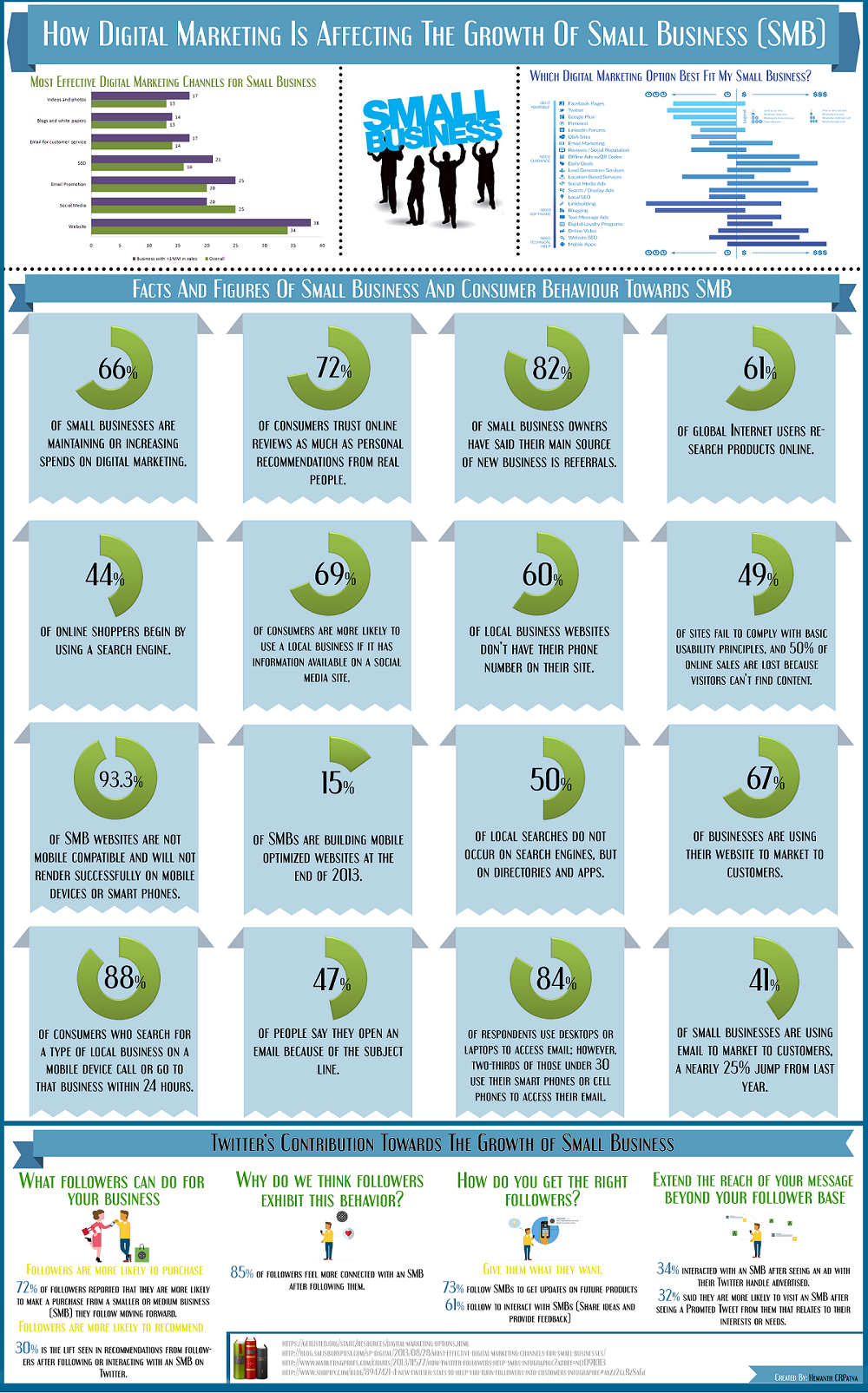
Click here to download the high resolution infographic
Conclusion:
Online marketing is the effective channel to promote small business in wide range of geographical area with minimal cost. Also it will purely depend upon area of business and the industry which you are promoting to your targeted audience.
Above described areas and steps to improve small business through internet marketing are helpful to promote the business in desired geography. Formulating the plan and combining it with other marketing efforts are also very much important to grow in tremendous way.
Online marketing strategies that are often outsourced include social media, search engine and local search marketing, because unless you have time to dedicate it's difficult to stay on the multiple changes that transpire when it comes to strategy. With content and email marketing, you can do much of it yourself, but it never hurts to ask experts for strategy advice to help get you started.
Source: http://www.siliconindia.com/blogs/blogs_new.php?30Sfk6297ltsXB39TX3KE01fg68xhnCy
Small business marketing for a local company can include many offline local advertising methods but needs to include a healthy portion of internet marketing strategies to be successful and maximize sales in today's economy. A small business that is doing most or all of its business online, needs to embrace an internet marketing strategy that helps it be seen by online users.
Five Key Areas of Online Marketing for Small Business
There are five areas of online marketing to improve the growth of small business. Some of them are more important to local, offline businesses, while others are more effective with online businesses. Many businesses engage in all five areas of small business marketing on the Internet.
Search Engine Marketing
This portion of digital marketing is critical for a small business. It provides a chance to compete with larger companies by being visible in search engines. Since people use search engines to find products both online and locally, it is important that your company place top in search results for words that relate to what you are selling. Professional Internet marketing firms offer this service under the name of search engine optimization. They can make sure your site is visible to those looking for your product when using a search engine.
Local Search Marketing
This includes website optimization for search results, but in addition, integrates a search engine's function of maps. This is especially true with Google, where your business can be listed with mapping and address information, giving a prospective customer what they need to visit your establishment. Your phone number and website address can also be listed. Customer services will often be available to help someone decide if they are interested in your product or service.
Content Marketing
This strategy revolves around providing a prospective customer information about your product or service, as well as information in general. People will attribute a certain level of expertise to a company, and this instills confidence in the consumer. Content marketing in the past was often done with printed brochures and guide books, but today, this can be done with articles and other forms of information on a business's website.
Social Media Marketing
This type of marketing can be tricky. Everyone talks about social media, but the truth is, it can be difficult for companies to integrate social media with their business. The type of media used, as well how it is used, is dependent upon the type of business you have. For some companies being in touch with their customers and giving them breaking news can be an important element of success. Other business such as a local restaurant, have seen success using social media by letting customers know of the latest specials and new additions to their menu. The most important aspect of social media is to use it to strengthen your customer base to achieve repeat sales.
Email Marketing
This form marketing is crucial to a small business online or offline. Essentially email marketing is about building a list of customers and prospective customers. This list of names and emails are people who are interested in your business, and you know this to be true because they have opted into this list themselves. Perhaps they were offered future updates on products as well as coupons to sign up. As this list grows, it becomes more valuable. In fact, many marketing professionals consider this to be, in the long run, the most important small business marketing strategy in the long run.
Steps To Promote Your SMB through Effective Digital Marketing Channel
Importance of Google – with approximately 80% of all searches being conducted via Google, it is critical to primarily focus SEO effort on this search engine. Yahoo and Bing are less important but still an important part of search engine marketing.
Keyword Selection – Pick keywords that are relevant to your business but also fairly easy to rank for. Look for multi-word phrases or ‘long-tail keywords’ as they are usually less competitive
Content is King - Prospects are more likely to buy from you if you are a thought leader, so establish yourself as one by creating extraordinarily helpful content. Take decisive action to ensure prospective customers are attracted to your site as a place to find answers.
Generosity is Also King – Another key part to attracting customers is your generosity in giving away information, access to tools, etc.,
Social Media – Focus on the top three social media venues: Twitter, Facebook, and LinkedIn. Remember, ‘be real’ and ‘be there’ to help the community rather than to push products.
Calls-to-Action – It is an important to provide something of value that solves a problem for visitors in exchange for their contact information. Often traffic will not be ready to buy right away, but a tempting call to action will lead them down the sales funnel.
Landing Pages - Everything that has been done to draw qualified traffic to a site, from improving SEO, to generating great content comes to a head in the landing page. Leads should be confronted with an inescapable case for them to leave their carefully guarded personal information on the form. Having one offer, recapping benefits, and a short form are all key.
Lead Nurturing – follow up calls to action with a ‘thank you’ email and a lead nurturing campaign that further entices leads down the sales funnel with additional free offerings– this is a free opportunity to keep touch with a lead.
Tracking Progress – Effective Inbound Marketing is all about experimentation. Select a strategy based on experience with customers and industry to get people to both visit and convert on the website. But anticipate that initial assumptions about keywords, or what it takes to get traffic to convert will not be right (or not right enough) and changes will need to be made. For this reason, it is essential to have a complete internet analysis tool-suite to help figure out what’s working and what’s not.
Patience & Tenacity – It’s easy to become discouraged and frustrated if Inbound Marketing is approached as a point solution. In reality, it’s a long term strategy only rewarding those who approach it with patience and tenacity.
Click here to download the high resolution info graphic
Click here to download the high resolution infographic
Conclusion:
Online marketing is the effective channel to promote small business in wide range of geographical area with minimal cost. Also it will purely depend upon area of business and the industry which you are promoting to your targeted audience.
Above described areas and steps to improve small business through internet marketing are helpful to promote the business in desired geography. Formulating the plan and combining it with other marketing efforts are also very much important to grow in tremendous way.
Online marketing strategies that are often outsourced include social media, search engine and local search marketing, because unless you have time to dedicate it's difficult to stay on the multiple changes that transpire when it comes to strategy. With content and email marketing, you can do much of it yourself, but it never hurts to ask experts for strategy advice to help get you started.
Source: http://www.siliconindia.com/blogs/blogs_new.php?30Sfk6297ltsXB39TX3KE01fg68xhnCy


